
A bookcase that thinks back
Packed shelves, real choices
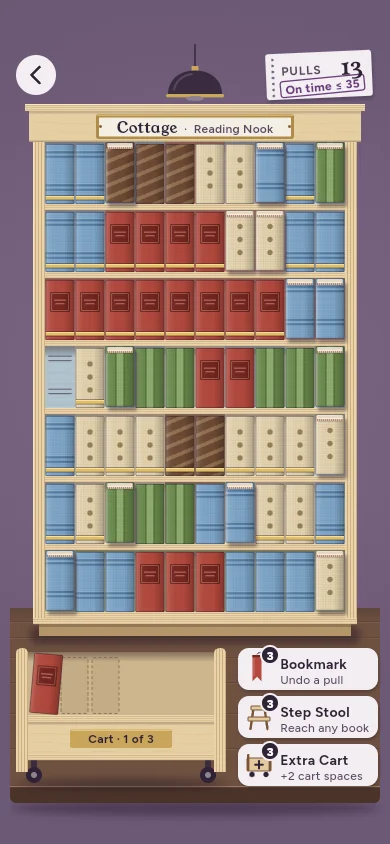
You can only pull a book from the end of a shelf, beside a gap, or beside a book already home. The book cart holds just a few, so the order of your pulls matters.
A picture in every case
The back panel shows the picture faintly; every book that goes home paints in a little more. When the last one lands, the reading lamp switches on.
Six rooms, 72 bookcases
From the Reading Nook to the Observatory. Later rooms add dividers and thick books; finishing eight bookcases opens the next room.
Your own pace
No timers, lives or energy. A library date-due slip counts your moves, and finishing within par earns an “On time” stamp.
How to play
- Tap a book you can reach. Books at a shelf end, beside a gap or beside a book already home tip forward to show they can move.
- Tap where it goes. The free spots of its colour light up, and the cart while it has room; books on the cart wait until you send them to a spot.
- Fill every spot. The spines complete the picture and the lamp lights the finished case.
Stuck? A Bookmark takes back a move, a Step Stool reaches any one book, and an Extra Cart adds two cart spaces. You earn tools as you finish bookcases.
Fair play
The 72 bookcases of the six rooms are free and complete. Everything else is optional, and prices come from the App Store:
| Rare Books Wing | 24 more bookcases with larger pictures. Bought once. |
|---|---|
| Quiet Hours | The cart never fills, so no shelf gets stuck. A switch in Settings. Bought once. |
| Book Tote | A pack of Bookmarks, Step Stools and Extra Carts. Buy it as often as you like. |
Questions
Are there ads?
No. No ads, no analytics, no account.
Does it play offline?
Yes, the whole game plays offline. Only buying or restoring a purchase needs the App Store.
How do I restore a purchase on a new iPhone?
Open Settings → Restore Purchases. The Rare Books Wing and Quiet Hours come back on any device signed in to the same Apple Account.
What happens to my data?
Your progress stays on your iPhone; the game collects nothing. See the privacy policy.
What if a bookcase gets stuck?
Use a tool, start the bookcase over, or turn on Quiet Hours if you have it. Nothing is lost by trying again.